60 Instagram Post Templates | Canva: Your Brand's Visual Anchor
You know the feeling. You've spent hours cultivating a specific aesthetic for your Instagram feed—maybe it's minimalist and airy, bold and colorful, or warm and textured. Your photos are on point, your captions are crafted, but then you need to share a quick tip, announce a sale, or present some data. You search for "Instagram infographic templates," and what do you find? A sea of generic charts, stark lines, and lifeless text boxes that feel like they belong to a completely different brand. They're functional, sure, but they stick out like a sore thumb, disrupting the visual harmony you've worked so hard to create.
Visual Harmony Over Generic Graphics
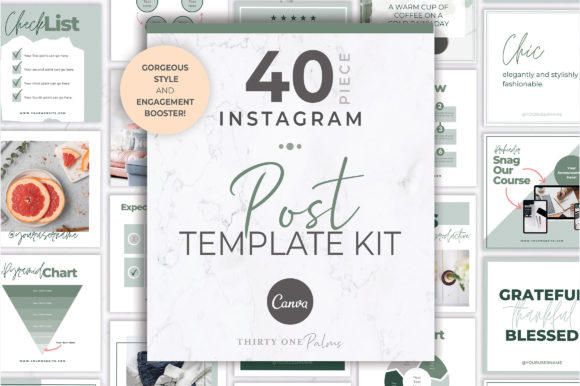
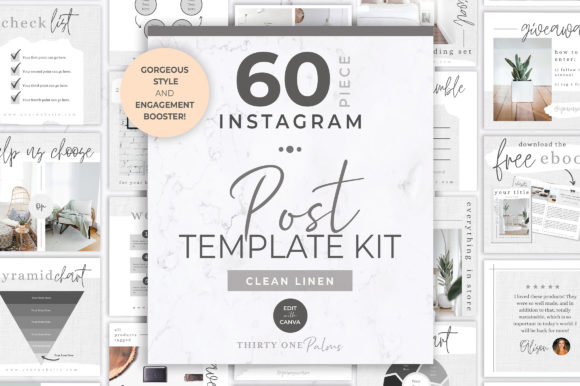
This is the core problem the 60 Instagram Post Templates | Canva kit is designed to solve. It's not just a collection of templates; it's a cohesive visual system built for brand consistency. The personality of these templates leans into modern elegance and strategic simplicity. You'll find a careful balance of clean, sans serif typography for readability, often paired with subtle script or handwritten accents for a personal touch. The layouts use ample white space and thoughtful grid structures, making them feel premium and intentional, not cluttered. The overall appeal is one of polished professionalism that doesn't sacrifice warmth—it's the kind of aesthetic that makes a feed feel curated and trustworthy.
The true value lies in its dual nature. The kit includes 30 engagement-boosting post templates specifically for data and announcements: infographics that simplify complex ideas, stylish charts that present numbers beautifully, and sleek templates for course or webinar launches. Then, there are 12 pretty posts—photo frames with elegant borders, blog post announcements with clean text overlays, sale graphics that feel celebratory rather than spammy, and quote templates that let the words shine. This mix ensures you have a tool for every content need, all within the same visual language. It's a complete design asset package that acts as the cornerstone for a strong brand identity on social media.
Where This Template System Truly Excels
While the primary use is clear, the versatility of these Instagram post templates extends far beyond a standard feed post. Consider these applications:
- For the Course Creator or Blogger: Use the infographic templates to break down a chapter or lesson into a carousel post. Announce your next live session with the webinar template, then use the quote template to share a powerful testimonial from a past attendee. The visual hierarchy is already built-in, guiding your audience's eye to the most important information.
- For the Small Business Owner: The sale announcement templates can be customized to reflect seasonal promotions without looking cheap. Use a photo frame template to showcase a new product in situ, and leverage a chart template to visually represent the benefits of your service versus a competitor's. This builds brand perception as organized and credible.
- For the Designer or Marketer: This kit is a fantastic starting point for client work or personal projects. It demonstrates how to maintain brand consistency across different content types. You can study the font pairing choices and layout logic to inform your own modern typography decisions for other projects, from web design to editorial design.
It's important to note that this is a template kit, not a premium font package. The fonts used within the templates are typically available through Canva's free or Pro library. The genius is in the pre-designed composition and aesthetic. You're not just buying layouts; you're investing in a pre-vetted design system that ensures your social media graphics will have a unified, professional look. This directly influences audience engagement—when your content looks cohesive and intentional, it builds recognition and trust, making followers more likely to stop scrolling and pay attention.
Making These Templates Your Own
Getting started is straightforward, but a few pro tips will elevate your results. First, choose the right template by considering your specific content goal. Is it to educate? Use an infographic. To celebrate? Use a sale announcement. To inspire? Use a quote template. Don't force a square peg into a round hole; let the template's inherent structure guide you.
Next, evaluate the fit with your existing brand. While the templates are designed for broad appeal, you'll need to customize the colors and, if possible, swap the fonts for your own brand's typeface. Canva makes this easy. If your brand uses a bold display font for headings and a clean serif font for body text, apply those consistently across every template you use. This is where you move from using a template to building a true brand identity. Test different font pairings within the template structure to see what feels most authentic to you.
Finally, consider the readability on a small screen. Before you post, zoom out to 50% on your computer. Can you still make out the main message? Is the visual hierarchy clear? The templates are built for mobile-first viewing, but your custom text and image choices can affect this. This practical testing ensures your social media graphics are not only beautiful but also functional, maximizing their impact in a fast-scrolling feed.
In a digital landscape saturated with noise, the 60 Instagram Post Templates | Canva kit offers a solution that prioritizes aesthetic cohesion and strategic communication. It’s a practical toolkit for anyone who understands that consistent, polished visuals are fundamental to building a recognizable and respected brand online. It’s less about flashy creative font choices and more about providing a reliable framework for professional